Summary
Rancher showed the new cluster stuck at:
- Configuring bootstrap node(s) custom-...: waiting for cluster agent to connect
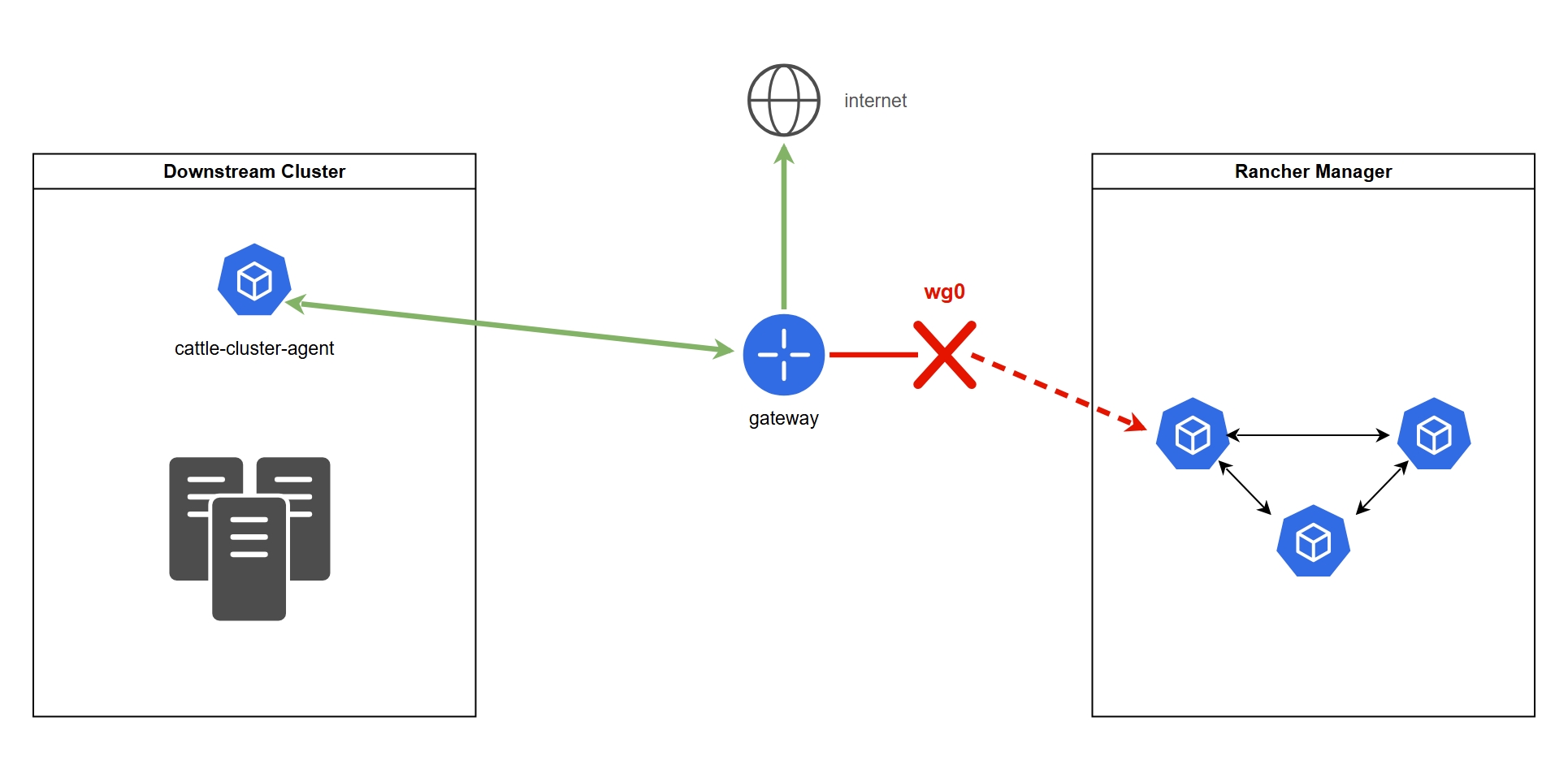
Rancher provisioned the node, but it blocks at this step until the cattle-cluster-agent inside the downstream cluster opens its tunnel back to the Rancher server. In this example, the agent itself, DNS and Rancher’s config were all fine. The WireGuard tunnel to the subnet where Rancher lives was down, so the agent could never connect.
Impact
- Provisioning blocked: the new downstream cluster was stuck at the bootstrap node step and never became usable.
- No visibility or control: the cluster’s resources (workloads, nodes, events) couldn’t be viewed or managed from Rancher until the WireGuard tunnel came back up.
Background: what is cattle-system?
Rancher manages Kubernetes clusters from one place. The cluster Rancher runs in is the local cluster. The clusters it manages are downstream clusters. cattle-system is the namespace where Rancher keeps its own components, and in every downstream cluster that includes the cattle-cluster-agent.
The agent opens a websocket tunnel from the downstream cluster to Rancher, and Rancher reaches the cluster only through it: the UI, kubectl through Rancher, and syncing the cluster’s state. The downstream cluster therefore only needs to reach Rancher on port 443. If that path breaks, an existing cluster goes Unavailable and a new one gets stuck at “waiting for cluster agent to connect”.
The cluster itself is not affected, though. Only Rancher loses its view of it. With the downstream cluster’s own kubeconfig, kubectl still works and you can see and manage all resources as usual.
Timeline
Detection: what we noticed
- Rancher UI: the cluster stayed in provisioning with the status
Configuring bootstrap node(s) custom-...: waiting for cluster agent to connectand never moved past it. - No resources in Rancher: the cluster’s pods weren’t visible in Rancher, because without the agent’s tunnel Rancher has no way to reach the cluster.
First wrong assumption: restarting
cattle-fleet-systemwould help. It won’t: that namespace runs Fleet (Rancher’s GitOps engine), which has nothing to do with the agent’s tunnel. The names are easy to mix up, but Fleet only watches Git repositories and deploys their manifests and Helm charts to clusters. The right namespace wascattle-system, wherecattle-cluster-agentruns.
Internal IPs are replaced with placeholders:
| Placeholder | Meaning |
|---|---|
<node-ip> | the downstream node I debugged from |
<gateway-ip> | the node’s gateway, also used for internet traffic |
<rancher-server-ip> | the Rancher server’s (private) IP |
<rancher-subnet> | the /24 subnet Rancher lives in |
<rancher-subnet-gw-ip> | the gateway (.1) of that subnet |
Step 1: Look at the agent
josipziva:~/$ kubectl -n cattle-system get pods

cattle-cluster-agent-...   1/1   Running   2 (96s ago)   6m8s
The pod is Running, but it has already restarted twice in 6 minutes. The agent’s startup script checks <server>/ping before it connects and exits when the check fails, so Kubernetes keeps restarting it. The restarts are a symptom of the same problem, not a separate one. Next, the 200 latest lines of logs:
josipziva:~/$ kubectl -n cattle-system logs -l app=cattle-cluster-agent --tail=200 --timestamps
The logs printed the startup environment and then stopped at the resolv.conf line. They never got to a “Connecting to wss://…” message. A hang at startup with no connection line means the agent can’t reach the server. Key values:
CATTLE_SERVER=https://rancher.example.com
CATTLE_SERVER_VERSION=v2.7.9
Step 2: Test reachability to the Rancher server
From inside the agent pod:
josipziva:~/$ kubectl -n cattle-system exec -it deploy/cattle-cluster-agent -- curl -vk https://rancher.example.com/ping
# *   Trying <rancher-server-ip>:443...
# command terminated with exit code 137
- It resolved
rancher.example.com→<rancher-server-ip>, so DNS inside the pod (CoreDNS) works. - The TCP connection to
<rancher-server-ip>:443hung: curl never got pastTrying.... - Exit code 137 is SIGKILL, not a curl timeout. Most likely the container was restarted (see the restarts above) while the
execwas still running. The hang is the evidence, not the 137.
A cleaner test would add a timeout, so the result is quick and repeatable:
josipziva:~/$ kubectl -n cattle-system exec -it deploy/cattle-cluster-agent -- \
  curl -vk --connect-timeout 5 https://rancher.example.com/ping
Step 3: Is DNS returning the right thing?
From the node (the node’s resolver, not pod’s CoreDNS):
josipziva:~/$ nslookup rancher.example.com
# Address: <rancher-server-ip>
The node and the pod agree: the name resolves to a private RFC1918 address. That’s typical for a split-horizon / VPN setup, where the name only works from a network that can route to <rancher-subnet>. DNS isn’t the problem, it gives the right answer. The question is whether we can reach that address.
Step 4: Does the node have a route, and does the path work?
josipziva:~/$ ip route get <rancher-server-ip>
# <rancher-server-ip> via <gateway-ip> dev eth0 src <node-ip>
ip route get doesn’t send anything. It asks the kernel which route a packet to that address would take:
via <gateway-ip>: the next hop. Rancher isn’t in the node’s own subnet, so the packet is handed to the gateway, which forwards it further.dev eth0: the interface the packet leaves through.src <node-ip>: the source address the packet will carry.
So the node knows where to send Rancher’s traffic: to the gateway. (If no route existed, you’d get Network is unreachable instead.) Most likely this is simply the default route, not a dedicated one for Rancher’s subnet. ip route shows which. The node did its part. The question is what happens after the gateway, so next I tested the path in layers:
josipziva:~/$ ping -c 3 <gateway-ip>             # gateway                  -> 0% loss    ✅ local, up
josipziva:~/$ ping -c 3 1.1.1.1                  # internet                 -> 0% loss    ✅ egress works
josipziva:~/$ ping -c 3 <rancher-subnet-gw-ip>   # Rancher's subnet gateway -> 100% loss  ❌
josipziva:~/$ ping -c 3 <rancher-server-ip>      # Rancher host             -> 100% loss  ❌
The decisive observation
Rancher’s host wasn’t the only thing down. The entire <rancher-subnet> was unreachable, including its own gateway <rancher-subnet-gw-ip>. The local gateway and the internet were fine, and the route sent <rancher-subnet> to the same gateway that was serving internet traffic without problems.
The whole request chain, from the agent to Rancher, and where it broke:
cattle-cluster-agent  (pod in cattle-system, downstream)
  │  wants: wss://rancher.example.com/v3/connect
  │
  ├──> CoreDNS: rancher.example.com = <rancher-server-ip>   ✅ Step 2-3
  │
  ▼
node <node-ip>
  │  ip route get: via <gateway-ip>                         ✅ Step 4
  ▼
gateway <gateway-ip>                                        ✅ ping
  │
  ├──> internet (1.1.1.1)                                   ✅ ping
  │
  └──> WireGuard tunnel                                     ❌ DOWN
       │
       ▼
       <rancher-subnet>
         ├─ <rancher-subnet-gw-ip>                          ❌ ping
         └─ Rancher <rancher-server-ip>:443                 ❌ ping, TCP hangs

agent never connects ──> Rancher: "waiting for cluster agent to connect"
Ping alone isn’t proof, because 100% loss could also mean ICMP is blocked. Here it lines up with Step 2, where a TCP connection to <rancher-server-ip>:443 hung as well. To pin down where the path breaks, test TCP directly and trace the route:
josipziva:~/$ telnet <rancher-server-ip> 443     # TCP to Rancher, independent of ICMP
josipziva:~/$ traceroute -n <rancher-server-ip>   # where does the path stop?
A traceroute that stops at <gateway-ip> puts the break on or behind that gateway.
Root cause
<rancher-subnet> is private and not internet-routable. The only way to reach it is a WireGuard tunnel behind the gateway <gateway-ip>.
That tunnel was down. The node, the cattle-cluster-agent, DNS and Rancher’s config were all fine, but without the tunnel nothing could reach <rancher-subnet>. The agent couldn’t reach the Rancher server, so it never connected, and Rancher stayed stuck at “waiting for cluster agent to connect”.
Resolution
The fix was on the gateway <gateway-ip>, not on the node. The WireGuard service only needed a restart. No config, key or endpoint changes were required:
josipziva:~/$ systemctl restart wg-quick@wg0   # restart the WireGuard tunnel
josipziva:~/$ wg show                          # check "latest handshake" for the peer
josipziva:~/$ ping <rancher-server-ip>         # can the gateway itself reach Rancher?
A working peer shows a recent latest handshake. If it’s missing, or several minutes old while traffic is being sent, the tunnel isn’t working, even if the wg interface itself is up.
As soon as <rancher-subnet> was reachable again, the agent connected on its own and provisioning continued. Nothing had to change on the node or in Rancher.
To confirm from the node afterwards:
josipziva:~/$ traceroute -n <rancher-server-ip>   # should now get past <gateway-ip> to the host
josipziva:~/$ kubectl -n cattle-system exec -it deploy/cattle-cluster-agent -- \
  curl -k https://rancher.example.com/ping   # expect: pong
Lessons learned
- “waiting for cluster agent to connect” is a connectivity problem, not a Rancher config problem, at least in my experience. It lives in the downstream
cattle-system, not incattle-fleet-system. - A
Runningpod doesn’t mean a working agent. Logs that stop before the “Connecting to wss://…” line point to the network. - Diagnose networking in layers, working outward: DNS → does the route exist? → gateway → internet → target subnet gateway → target host. The first layer that fails shows exactly where the break is. Here the whole target subnet was dead while everything else worked, so the problem was the WireGuard tunnel behind the gateway, not the node.
Action items
- Monitor the WireGuard tunnel on the gateway (
latest handshakeper peer) and alert when it goes stale. - Add a reachability check from downstream clusters to
rancher.example.com/ping. - Alert on the Rancher side when a cluster goes Unavailable or provisioning hangs for longer than N minutes.
- Document the layered network check above as a runbook for this error.